Dat’s Bad Design: Diversity in Control Schemes Pt.1

Recently, our discussions have leaned towards affordance and learning in users. During my presentation on making users learn, I heard a very good point from the audience that really hit home from me. That point was the subtle, very subtle differences in controllers.

As a gamer, I don’t restrict myself to one console but instead play a variety of games on a variety of platforms. As a result, I’m used to switching between game scenarios as well as control schemes on the fly. A common transition for me is between playing games on the Sony Playstation and Microsoft’s Xbox systems (of course in this example I’m referring to the PS3 and Xbox 360)

Now let’s take a look at a side by side comparison of the Xbox 360 and PS3 controllers.
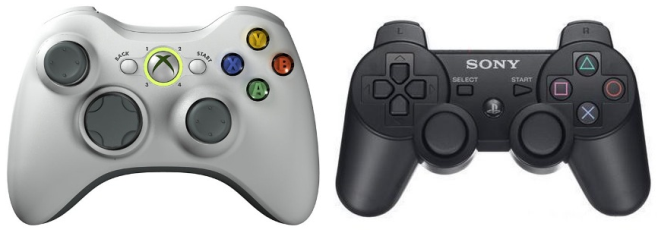
Xbox 360 on left, PS3 on Right

Xbox 360 on left, PS3 on Right

There are clearly a lot of similarities between the two controllers. First off they share the same schema of having two analog sticks and a d-pad, albeit they’re positioned differently on the controllers. There are also four face buttons, a select, start and a home button (shaped like an X for the 360 and the PS logo for the PS3). While not visible in this image, both controllers also have a set of four shoulder buttons.

Now as someone who’s played a lot of games, it’s generally very easy for me to pick up a 360 controller or a PS3 controller and acclimate to the slightly different positioning of buttons and analog sticks. The real problem with these differing control schemes though is not the placement of control elements but the way they’re labeled.

On the Playstation the face buttons are labeled X, Square, Triangle and Circle. On the 360 they are labeled (in the same order counter to the PS3) A, X, Y and B. This really isn’t an issue unless you’re actually playing a game that starts yelling Quick Time Events at you where you have to rapidly press a sequence of buttons. Now I mostly play PS3 games, so when a game tells me I need to mash a sequence of buttons on the PS3 I can usually handle that pretty well. But with the same scenario on the 360 I find myself fumbling because I’m used to the placement of the PS3 controllers! So when I’m asked to press A, there’s a disconnect in my brain because my hands are in the optimal position for Playstation but my brain is trying to translate that into 360 controls.

God-of-war-quicktime

X on the PS3 controller is in a completely different place than the 360!

149073-defenseforce

The X on the 360 is where Square normally is! Agh!


The same problem arises with the shoulder buttons. The PS3 uses R1, R2 to denote the right two shoulder buttons front and back while L1 and L2 represent the left two shoulder buttons. The 360 however uses RB and RT and LB and LT for its shoulder buttons.

This isn’t necessarily Microsoft and Sony’s fault. It’s a fact that different companies with different products will strive to create diversity and cater to their own consoles’ needs. Just like there is no singular beat-all interface, there is no single beat-all controller scheme. At least in the case of Sony and Microsoft there isn’t too huge of a difference. A normal gamer can still switch between the two consoles pretty seamlessly and there is a lot of overlap.

Not like some other controllers!!

The WiiU's gamepad controller!

The WiiU’s gamepad controller!

To be continued in Part 2!!

Prototyping Two Click Pizza

Class last week focused on prototyping. Specifically it focused on creating sketches and transferring them into paper prototypes.

We started with a quick wrap up affordance from last week and discussed the physicality of various types of LolCats, or at least how cats tend to view objects shaped for their lounging. This really made my understanding of affordances stronger as it gave me good examples of physical affordance.

This bowl belongs to me! MWAHAHAHA!

This bowl belongs to me! MWAHAHAHA!

After our discussion on affordance we started a very interesting and engaging group activity. The professor gave us a prompt where we had to design an application for ordering pizza. As is practically tradition in our class, we all got up and started using the whiteboards at first to create a rough sketch of the app and its features.

Two Click Pizza

Our group created 2-Click Pizza, the goal of which was to rapidly meet a user’s need for pizza. In just two taps a user could have a pizza ordered and delivered to them. As we rapidly prototyped we found that many of the assumptions we made when we first started creating the app were debased or needed to be elaborated on. While it was easy enough for us to decide on the general framework of what we wanted to do, it wasn’t until we started drawing out the individual screens our app would have that we realized the problems and missing elements of our application.

After the sketching we created paper prototypes using grid paper. The professor introduced the 960 concept which is used by web designers to align elements on a screen. I’ve been developing websites for five years and while I had a general idea of the rules of alignment and formatting elements, I didn’t have a solid name for that concept. The 960 grid helped us create a really stellar looking prototype that can be seen below.

Two Click Pizza App


In software development, I’m pretty used to rapid prototyping and just throwing ideas out there. I did miss out on using Balsamic in class but definitely want to try it sometime as it is a prototyping software that seemed interesting. (Though thinking about that just reminds me of the guy who created IOS7’s interface using Microsoft Word: Check out John Sarver’s blog post for more info on that)

Anyway thanks for reading! Seeya next time!


Affordance: Right Under our Noses

In last week’s class we discussed heuristics in usability and he use of affordance when designing. I find affordance to be a very interesting concept. Affordance is how a product portrays itself in a way that it clues in the user to its use. A door has a knob which signifies it can be pulled on, which signifies it can be opened but if it has a keyhole then that means it can be locked! Buttons asked to be pushed, switches want to be flipped. What really interests me about these affordances is that we as human beings have adapted to them! We weren’t born with these affordances ingrained into our brains but somehow we adopted them!

Some simple everyday affordances

Some simple everyday affordances

Ok, no big deal. I mean we learned to push and pull a door in kindergarten right?

Well what about electronics? I was sitting around today sliding my fingers across the screen of my iPhone to navigate a window when it suddenly occurred to me that I could use any smartphone intuitively. At least any smartphone that operates via touch because of my experiences with IOS.


Beyond the above plug for IOS7, let’s talk about IOS7 has big 3D buttons that beg to be pushed and when I slide I can see the next screen I’m going to as I slide my finger. When I’m in an app, I intuitively pull down the top portion of the app to load new information and I’m reassured by the ability to pull up sidebars by sliding from left and right. These rules of engagement aren’t coincidence but are design heuristics and innovation that IOS did really really right.

It’s not just isolated to smartphones for me but even other modern day innovations. As a gamer, I have become used to the common d-Pad 4 face button control scheme most modern game consoles use. Even with differing face buttons I still can seamlessly switch between video game devices because there is a consistent standard between systems.

It’s these affordances that modern industries have to follow and many times try to defy and innovate in. In some cases there’s great success (such as with the original IOS) and sometimes there isn’t…(WiiU? Anyone? Anyone?) It all depends on usability and practicality. As awesome as it is to innovate, if no one uses your product it’s useless.

Thanks for reading! Seeya next time!

Designing with the Mind in Mind AKA Learning is Hard

We as designers and developers are always on the cutting edge. Innovation is what gets us excited and recognized so the products we’re most interested in creating are ones that are really out there and really unique.

But this is not always a good thing. In class on Wednesday we discussed Jeff Johnson’s Designing with the Mind in Mind which really focused on user centric design and how to appeal to the user when designing. Many factors play into making a good product that the user is willing to adopt, from the core gestalt principles to time management. I thought there was a lot of really good information presented in Johnson’s book and definitely think it’s a good read for any designer.

Some key points I wanted to pull out from the reading was the part that I presented to the class which I can sum up in one word: Learning is hard. Innovative products are new and exciting but also need to be adopted by users or fall to the wayside and be abandoned. There have been plenty of innovations in the field of technology that have sacrificed too many usability principles to actually be adopted.

Johnson has stated that there are three conditions that must be met before users will learn and adopt a product:

  • Operation must be task-focused, simple and consistent
  • Vocabulary is task-focused, familiar and consistent
  • Risk is low

Basically a product can’t be tangential. It has to be focused and on target. You don’t want your toaster making calls for you in the middle of breakfast right? The vocabulary a product uses also has to be familiar and most importantly consistent. If an interface for a product is labeled with mismatched text from the manual that can be extremely problematic when trying to learn how to use it. Finally, the risk of failure or the consequences of failure must be low. You can’t or at least don’t want to market a toaster that will blow the user’s kitchen up if they buy it…right? Maybe a cancel button would be a bit more friendly.

In one of the earlier posts in my blog, I reviewed the Google Glass. Google Glass was something I was personally very excited about. Unfortunately it was a bit hard to wear and the functionality was difficult to learn and understand. Especially since it didn’t have any inbuilt prompts despite being an innovative new creation. This gave me the impression it was a little gimmicky which I can understand for a pre-alpha prototype of course.

Virtual-Boy-Set

Nintendo’s Virtual Boy was a major failure despite it’s innovations into “VR”

In a more unforgivable example, in gaming generations past Nintendo once unleashed the Virtual Boy on their unsuspecting worldwide audience. The console was panned across the board for being a poor attempt at “Virtual Reality” supplemented by the terrible design of the console stand. The Virtual Boy, pictured above, was meant to sit on a table while the player put their eyes up to the console which served as a Fishtank virtual reality environment. The graphics of the console though were a searing red that left the eyes worn and in pain after just a few minutes of gameplay and players unused to the controls couldn’t look at their controller while playing.

Some of these examples also relate to a previous blog post where I quoted my colleague Spencer Edwards. Many times the above problems arise because developers think about themselves first and the users second. If it hasn’t been ingrained in to your brain yet memorize it now. “Users first, designers second.”

Or else bad things may happen to your career!

Thanks for reading! Seeya next time!

Ideation: “OP In, Don’t OP Out”

Class this week focused on generation of ideas and the creative process when brainstorming. Our readings focused on methods of ideation such as sketching and cultural probes. Cultural probes are activities that explore the qualitative side of subjects and help designers understand their user base better.

In class we did a brief exercise where we read up on three pre-prepared personas and were presented with a problem: managing online identity. The three personas had diverse backgrounds, levels of understanding of online identity and different requirements for what they wanted in terms of managing their online identity.

Split into teams, the class analyzed the qualitative reports on the personas and outlined ideas.

photo 3

Taking this into account we were asked to individually brainstorm ten ideas to help the personas using sketching. I came up with nine ideas in fifteen minutes! Not bad, but not ten. Still I liked most of my ideas though some of them were definitely gimmicky.

photo 2

The value of these sketches though were that they weren’t concrete nor were they complete ideas. After making these sketches and discussing with the team we came up with a solution, that integrated multiple brainstormed ideas into one!

photo 1

We decided to create an informational business card that directed people to a website called OPin. OPin, which stood for Online Profile Interactive Network, aggregated data from different social networking sites and online identity sources and presented them to a user. OPin allowed users to gain information about their activities on social media networks and were rated on their activities online. These ratings would help inform users if they were making sound decisions about their online identity or were negatively impacting their image. The idea melded together three different ideas from the team that we had created during sketching and in the span of an hour we had a really interesting idea we could iterate on.

Coming up with creative ideas and solutions is difficult, but with the correct (or even incorrect) methods ideas can become easy and abundant.

Thanks for reading! Seeya next time!